


 Photo: William Hook / Unsplash
DHL Express (shipping courier)
Connect DHL Express (international and GCC shipping) with your MyDHL API key, secret and account number.
🖥️ Open in dashboard/couriers/install?id=dhlexpressDHL Express is an international shipping courier, including GCC destinations. You connect it with the MyDHL API details from your DHL developer account. Category: Shipping courier · integration built by Vondera · no price shown.
Connect DHL Express
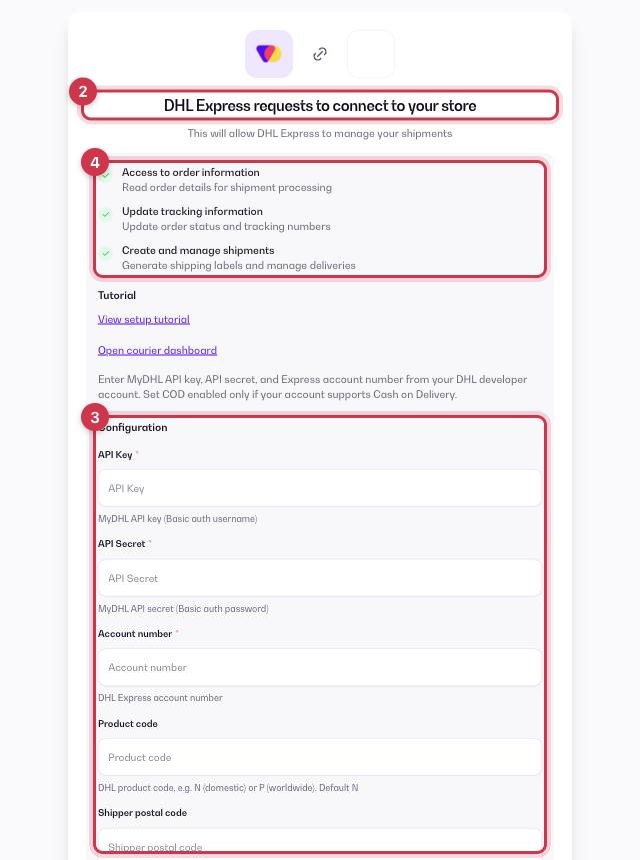
- Open Apps in the dashboard and go to the Apps tab (tap the Shipping filter to see couriers only).
- Find DHL Express and click Get.
- Fill in the Configuration fields below.
- Review the permissions (read orders, update tracking, create shipments) and click Allow.
API Key
Required. From your DHL developer account (MyDHL API).
API Secret
Required. From your DHL developer account.
Account number
Required. Your DHL Express account number.
Product code
Optional. N for domestic or P for worldwide. Defaults to N.
Shipper postal code
Optional. Recommended for GCC shipments.
COD enabled
Optional. Turn on only if your DHL account supports Cash on Delivery.
Shipper city, Shipper address
Optional. Where your shipments are sent from.
💡 TipThe setup page has a View setup tutorial link for DHL Express.
After you connect
DHL Express then appears in Orders › Couriers. In Settings › Shipping Settings you can make it your Default courier, turn on Auto-assign courier for new orders, and turn on Sync status from courier so order statuses follow DHL Express's updates. More in How courier apps work.
Where to get your DHL Express API key details
- You need a DHL Express account number (9 digits): get it from DHL Express Egypt sales if you don’t have one.
- Register at developer.dhl.com, click Get Access! for the MyDHL API and submit the form with your account number.
- Within about a business day you get two emails: test access and production access approved.
- Open the production link, click your app, then Show Key to copy the API Key and API Secret.
Common questions
Does DHL Express cost anything in Vondera?
No price is shown in the App Store. Shipping fees are agreed between you and DHL Express, who bills you directly.