


 Photo: William Hook / Unsplash
Mylerz (shipping courier)
Connect Mylerz with your API username and password, and set service type and warehouse.
🖥️ Open in dashboard/couriers/install?id=mylerzMylerz is a shipping company you can connect to Vondera to send it your orders and get tracking updates back. Category: Shipping courier · integration built by Vondera · no price shown.
Connect Mylerz
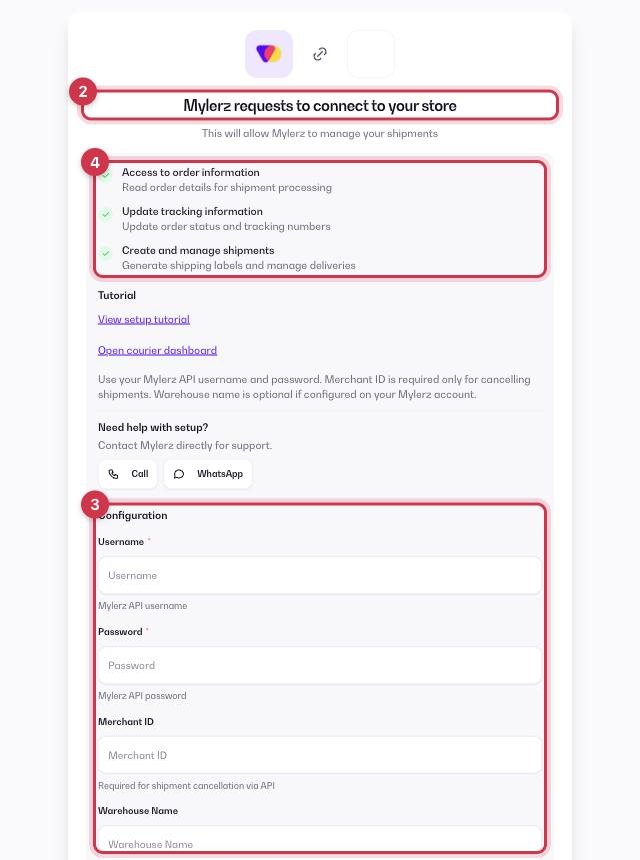
- Open Apps in the dashboard and go to the Apps tab (tap the Shipping filter to see couriers only).
- Find Mylerz and click Get.
- Fill in the Configuration fields below.
- Review the permissions (read orders, update tracking, create shipments) and click Allow.
Username
Required. Your Mylerz API username.
Password
Required. Your Mylerz API password.
Merchant ID
Optional. Needed only if you want to cancel shipments from Vondera.
Warehouse Name
Optional. Your Mylerz warehouse name.
Service Type
Optional. DTD, DTC, CTD or CTC. Defaults to DTD.
Service
Optional. SD (same day) or ND (next day).
Neighborhood override, District override, Customer Zone Code
Optional. Use only if Mylerz asks you to set them.
💡 TipThe setup page has a View setup tutorial link and Call / WhatsApp buttons for Mylerz support.
After you connect
Mylerz then appears in Orders › Couriers. In Settings › Shipping Settings you can make it your Default courier, turn on Auto-assign courier for new orders, and turn on Sync status from courier so order statuses follow Mylerz's updates. More in How courier apps work.
Where to get your Mylerz details details
- Mylerz gives API access on request: ask your Mylerz account manager for your API username and password.
- Ask them in the same message for your Merchant ID (needed to cancel shipments from Vondera) and your warehouse name.
Common questions
Does Mylerz cost anything in Vondera?
No price is shown in the App Store. Shipping fees are agreed between you and Mylerz, who bills you directly.