


 Photo: William Hook / Unsplash
Geidea Egypt
Connect Geidea Egypt with your merchant public key and API password.
🖥️ Open in dashboard/payment-gateways/install?id=geidea-egGeidea is a payment provider in Egypt for accepting card payments in EGP.
Supported currencies: EGP
Connect Geidea Egypt
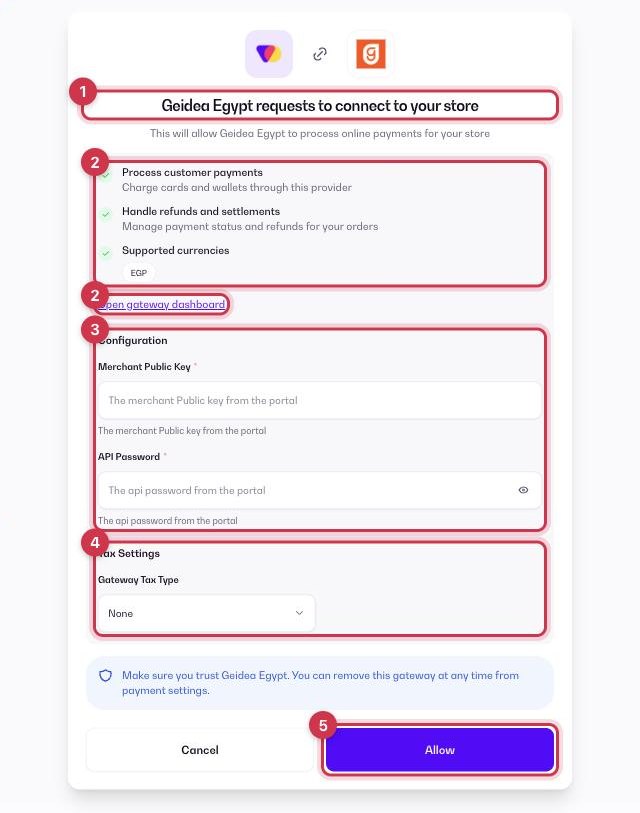
- Go to Apps and open the Payment Gateways category (or go to Store › Payment settings → Payment Gateways), then click Get or Install on Geidea Egypt.
- On the connect screen, check the permissions and click Open gateway dashboard to sign in to your Geidea Egypt merchant dashboard.
- Fill in the Configuration fields (see the table below).
- Optional: under Tax Settings, choose a Gateway Tax Type — None, Fixed or Percentage — to add an extra fee when customers pay with Geidea Egypt.
- Click Allow. Geidea Egypt now shows as your active gateway in Store › Payment settings.
Configuration fields
Merchant Public Key
In your Geidea merchant dashboard (Geidea portal).
API Password
In your Geidea merchant dashboard (Geidea portal).
Where to find these values in Geidea
- Sign in to the Geidea Merchant Portal (Egypt).
- Go to Payment Gateway › Gateway Settings.
- Copy the Public Key into Merchant Public Key, and the API Password into API Password. Geidea may also have emailed them to you.
ℹ️ Good to knowCopy the live values (not test or sandbox). Menu names can differ slightly between accounts; if you can’t find a value, ask the gateway’s support or your account manager.
Common questions
Can I use Geidea Egypt together with another gateway?
No. Only one online gateway can be active at a time. To switch, remove the current gateway from Store › Payment settings and connect the new one. See the payment gateways overview.