

 Photo: William Hook / Unsplash
Payment gateways: overview
Accept card and wallet payments online with one connected gateway, and pick the right one for your currencies.
🖥️ Open in dashboard/dashboard/payment-settings🎬 Watch the video
Videos are in Arabic.
A payment gateway lets your customers pay online by card or wallet at checkout. Vondera connects to many gateways from the App Store. Each one asks for the credentials from your account with that provider.
ℹ️ Good to knowOnly one online gateway can be active at a time. To switch, go to Store › Payment settings → Payment Gateways, click Remove on the active gateway, then connect the new one.
How to choose
- Selling in Egypt in EGP: Paymob (cards, plus mobile wallets such as Vodafone Cash), Fawry, Geidea Egypt, Kashier, XPay Egypt, EasyKash, Fawaterak, or Flash Egypt if you want InstaPay.
- Selling in the Gulf or in several currencies: MyFatoorah, Tap Payments, Telr, Paytabs, Checkout.com or Adyen.
- Already have a merchant account with a provider? Start with that one — you only need its keys.
Gateways and supported currencies
USD, EUR, GBP, AED, SAR, EGP, KWD
USD, EUR, GBP, AED, SAR, EGP, KWD
EGP, USD, SAR, EUR, GBP, QAR, AED, KWD
EGP, USD, EUR, SAR
EGP
EGP
EGP
USD, EUR, EGP, GBP
KWD, SAR, BHD, AED, QAR, OMR, JOD, EGP
EGP
19 currencies, including SAR, USD, EUR, GBP, AED, KWD, EGP, QAR
KWD, SAR, AED, BHD, QAR, OMR, JOD, EGP, USD, EUR, GBP
AED, SAR, USD, EUR, GBP, EGP, QAR, OMR, BHD, KWD, JOD
EGP
How connecting works
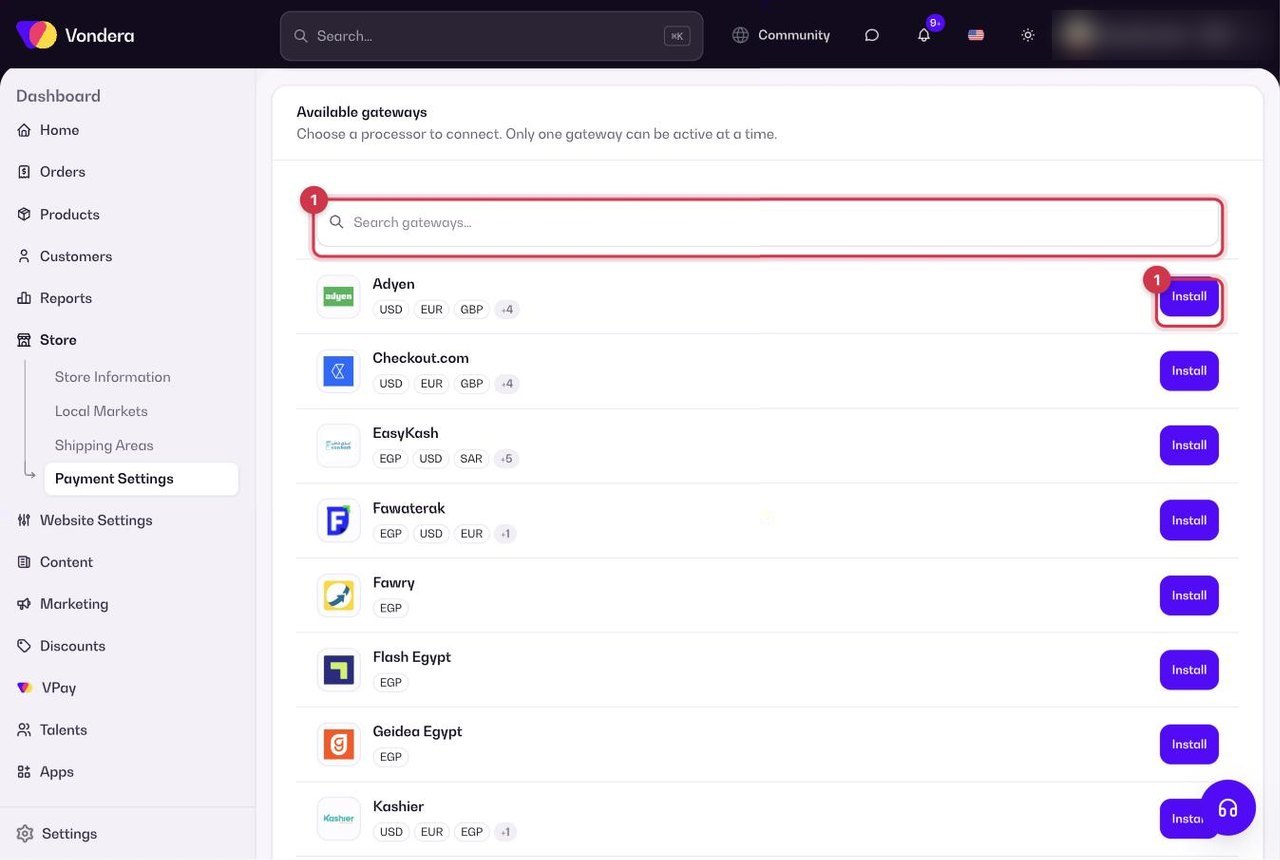
- Click Install on a gateway in Store › Payment settings → Payment Gateways, or Get on it in the App Store.
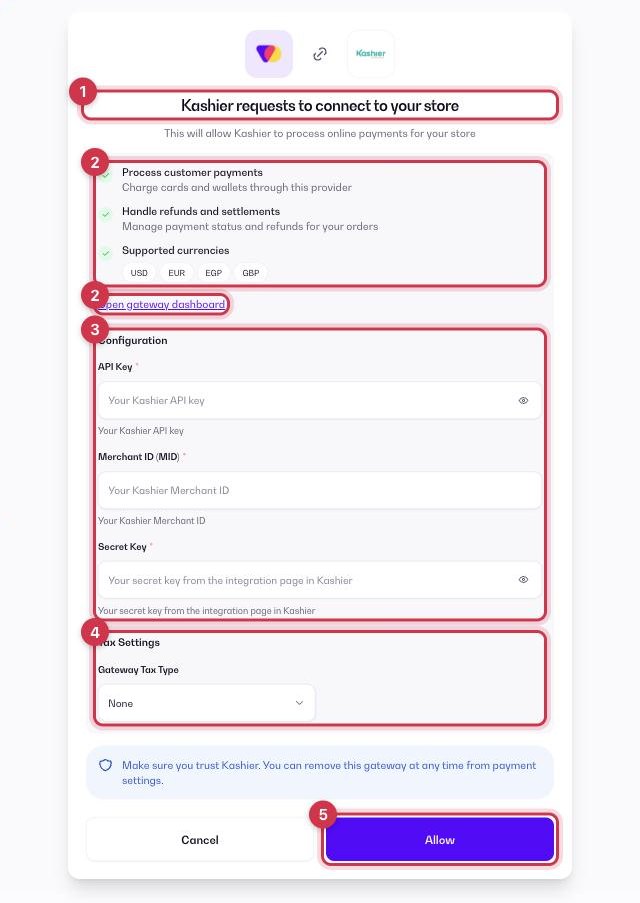
- On the connect screen, review the permissions (process customer payments and handle refunds and settlements) and the supported currencies.
- Enter the credentials from your gateway merchant dashboard in the Configuration form. Some gateways also need you to add a webhook or callback URL — it is shown in the app.
- Optionally set a Gateway Tax Type (None, Fixed or Percentage) to add an extra fee for paying with this gateway.
- Click Allow. The gateway appears as active in Store › Payment settings, with an Active badge and its currencies.
ℹ️ Good to knowProcessing fees are set by each provider under your agreement with them.
💡 TipWant bank transfer, InstaPay by receipt, wallets or cash on delivery as well? Those are set up separately — see Payment methods.
Common questions
Can I offer two gateways at checkout?
No. Only one online gateway can be active. You can still add offline methods and cash on delivery next to it.
How do I disconnect a gateway?
Go to Store › Payment settings → Payment Gateways and click Remove on the active gateway card.