


 Photo: William Hook / Unsplash
J&T Express (shipping courier)
Connect J&T Express with your VIP Portal code and password and your pickup address.
🖥️ Open in dashboard/couriers/install?id=jtexpressJ&T Express is a shipping company you can connect to Vondera to send it your orders and get tracking updates back. Category: Shipping courier · integration built by Vondera · no price shown.
Connect J&T Express
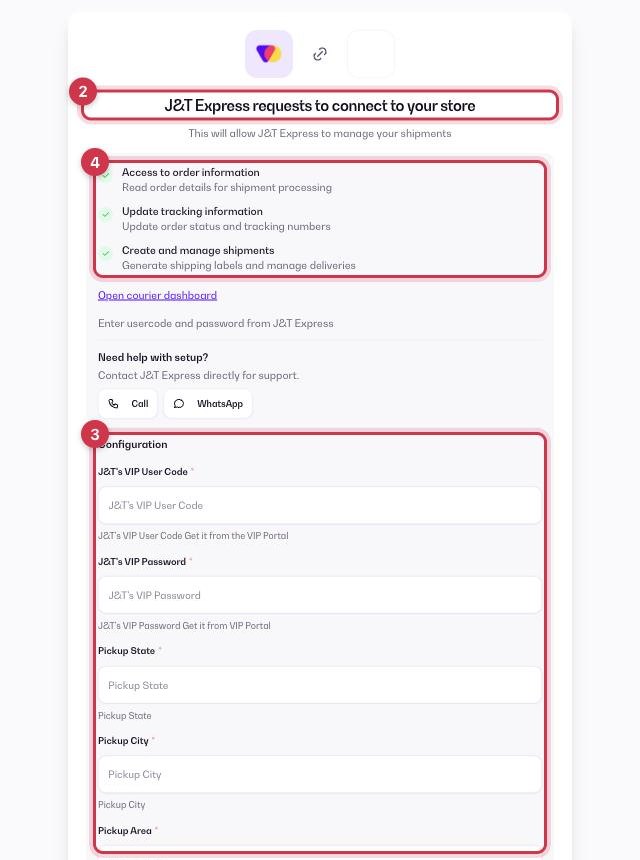
- Open Apps in the dashboard and go to the Apps tab (tap the Shipping filter to see couriers only).
- Find J&T Express and click Get.
- Fill in the Configuration fields below.
- Review the permissions (read orders, update tracking, create shipments) and click Allow.
J&T's VIP User Code
Required. From the J&T VIP Portal.
VIP Password
Required. Your J&T VIP Portal password.
Pickup State, Pickup City, Pickup Area
Required. Where J&T picks up your shipments.
Pickup Address
Required. The full pickup address.
💡 TipCan't find these details? Use the Call or WhatsApp buttons on the setup page to reach J&T Express support.
After you connect
J&T Express then appears in Orders › Couriers. In Settings › Shipping Settings you can make it your Default courier, turn on Auto-assign courier for new orders, and turn on Sync status from courier so order statuses follow J&T Express's updates. More in How courier apps work.
Where to get your J&T Express details details
- Your user code and VIP Password are the login of the J&T VIP portal (vip.jtjms-eg.com).
- J&T issues them when they open your business account. No account? Call the J&T hotline 15885 to open one.
Common questions
Does J&T Express cost anything in Vondera?
No price is shown in the App Store. Shipping fees are agreed between you and J&T Express, who bills you directly.