


 Photo: William Hook / Unsplash
Tap Payments
Connect Tap Payments with a single secret key — no webhook setup needed.
🖥️ Open in dashboard/payment-gateways/install?id=tapTap Payments is a payment provider widely used in the Gulf. It needs only your secret key; payment updates are sent automatically for each charge.
Supported currencies: KWD, SAR, AED, BHD, QAR, OMR, JOD, EGP, USD, EUR, GBP
Connect Tap Payments
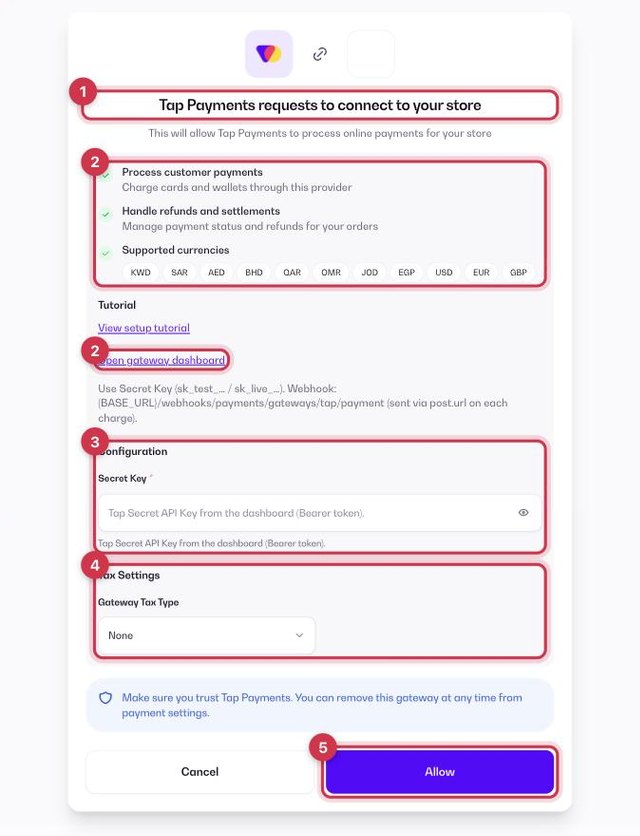
- Go to Apps and open the Payment Gateways category (or go to Store › Payment settings → Payment Gateways), then click Get or Install on Tap Payments.
- On the connect screen, check the permissions and click Open gateway dashboard to sign in to your Tap Payments merchant dashboard. Click Tutorial if you want a step-by-step guide.
- Fill in the Configuration fields (see the table below).
- Optional: under Tax Settings, choose a Gateway Tax Type — None, Fixed or Percentage — to add an extra fee when customers pay with Tap Payments.
- Click Allow. Tap Payments now shows as your active gateway in Store › Payment settings.
Configuration fields
Secret Key
In your Tap merchant dashboard. It starts with sk_test_ for testing or sk_live_ for real payments.
Where to find these values in Tap
- Sign in to the Tap Dashboard.
- Open goSell › API Credentials.
- Copy the Secret Key for Production (starts with sk_live_), not the Publishable key. Keys appear once your account is activated.
ℹ️ Good to knowCopy the live values (not test or sandbox). Menu names can differ slightly between accounts; if you can’t find a value, ask the gateway’s support or your account manager.
Common questions
Do I need to add a webhook in Tap?
No. The webhook is sent automatically with each charge.
Can I use Tap Payments together with another gateway?
No. Only one online gateway can be active at a time. To switch, remove the current gateway from Store › Payment settings and connect the new one. See the payment gateways overview.