

 Photo: Clay Banks / Unsplash
Customer wallet and store credit
Let signed-up customers earn store credit through cashback and spend it at checkout.
🖥️ Open in dashboard/dashboard/settings?section=customer-walletThe customer wallet gives each signed-up customer a store credit balance. They earn credit through cashback and manual adjustments, and they can spend it on future orders. It is a simple way to reward loyal customers and bring them back.
Where to find it
- To turn it on: Settings › Customer Wallet.
- To create cashback: Discounts › Add New, with the type Cashback.
- To see a customer’s balance: open the customer in Customers and look at Store credit.
Turn on the wallet
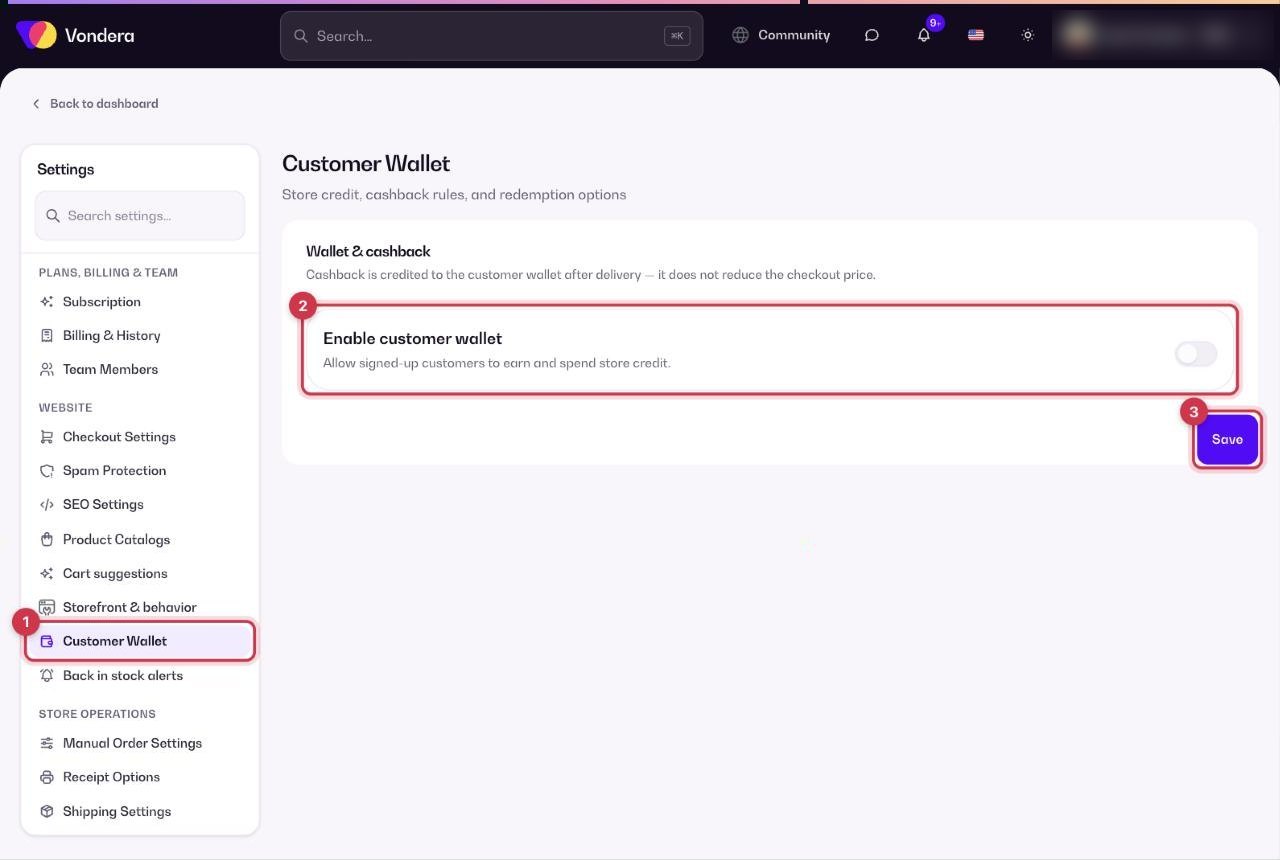
- Open Settings and choose Customer Wallet in the settings menu.
- Turn on Enable customer wallet.
- Click Save. More options for cashback and redemption appear once the wallet is on.
Reward customers with cashback
- Go to Discounts and click Add New.
- Choose the type Cashback and set the value.
- Set any conditions you want, such as products, minimum subtotal or dates, and make sure it is Active.
- Create the discount. Customers who qualify get the cashback in their wallet.
Enable customer wallet
Lets signed-up customers earn and spend store credit.
Cashback
A discount type that adds credit to the customer’s wallet instead of lowering the order price.
Store credit
The balance shown on each customer’s profile, from cashback and manual adjustments.
ℹ️ Good to knowCashback is added to the wallet after the order is delivered. It does not reduce the price at checkout. Customers spend their credit at checkout when they are signed in.
💡 TipTell customers about the wallet on your product pages or in your social posts ("Get 10% back as store credit"). Rewards only bring customers back if they know about them.
Common questions
Why can’t a customer use their wallet?
The wallet is only available for customers with a signed-up account. Guests who check out without an account cannot earn or spend credit.
When does cashback reach the wallet?
After the order is delivered.
Does cashback lower the order total?
No. The customer pays the normal price and receives the cashback as store credit for a later order.