

 Photo: Vitaly Gariev / Unsplash
Store cache and danger zone (reset or delete your store)
Flush the cache when changes don’t show on your website, and understand Reset and Delete before you touch them.
🖥️ Open in dashboard/dashboard/store-informationAt the bottom of the Store Information page there are two special sections. Store Cache is a safe, everyday tool for when your website doesn’t show your latest changes. Danger Zone holds two actions that affect your whole store and should only be used when you are completely sure.
Click Store in the sidebar and scroll down below the store details.
Flush the store cache
To load fast, your website keeps a saved copy of your pages. Sometimes, after you change a price, a logo or a delivery fee, customers still see the old version for a while. Flushing the cache clears that saved copy so the latest version loads.
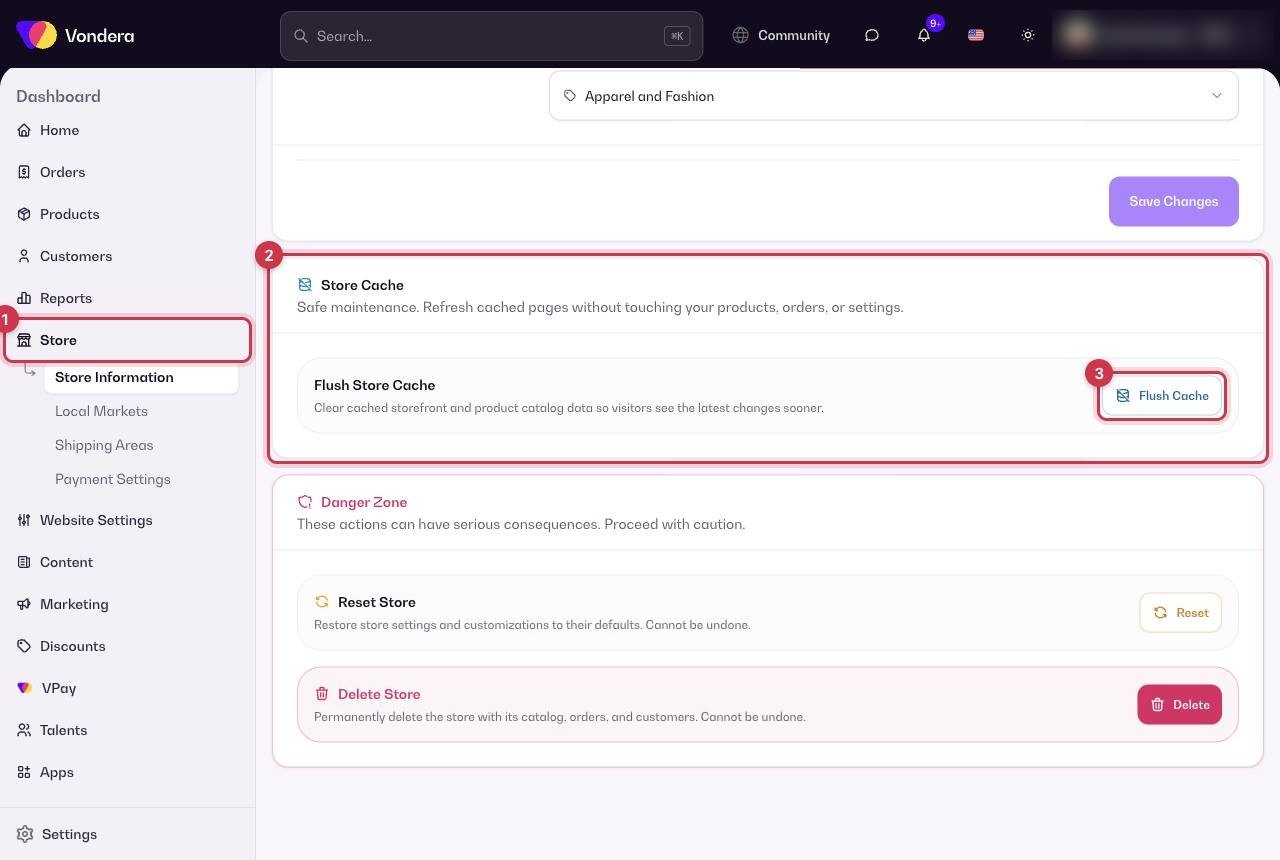
- Click Store in the sidebar.
- Scroll to Store Cache.
- Click Flush Cache.
- Open your store and refresh the page.
Danger Zone
Common questions
My changes don’t show on the website. Should I reset the store?
No. Use Flush Cache instead. Reset is never needed to fix display problems.
Can I get my store back after deleting it?
Treat deletion as final. If you might need the store again, don’t delete it. Contact support to discuss your options first.
How often should I flush the cache?
Only when you need it, for example when a change you saved doesn’t show on your website after a refresh.