

 Photo: Nick Morrison / Unsplash
Media gallery: upload and manage images and videos
Keep all your store images and videos in one place and reuse them in products, collections, pages and posts.
🖥️ Open in dashboard/dashboard/gallery🎬 Watch the video
Videos are in Arabic.
The Media Gallery is the library for every image and video in your store. Whatever you upload here can be picked again anywhere the dashboard shows a gallery button: product images, collections, your logo, custom pages, blog posts and payment method icons. Upload once, use it everywhere.
Go to Content › Media Gallery. You can also reach it from Settings › Media Gallery Page.
Upload files
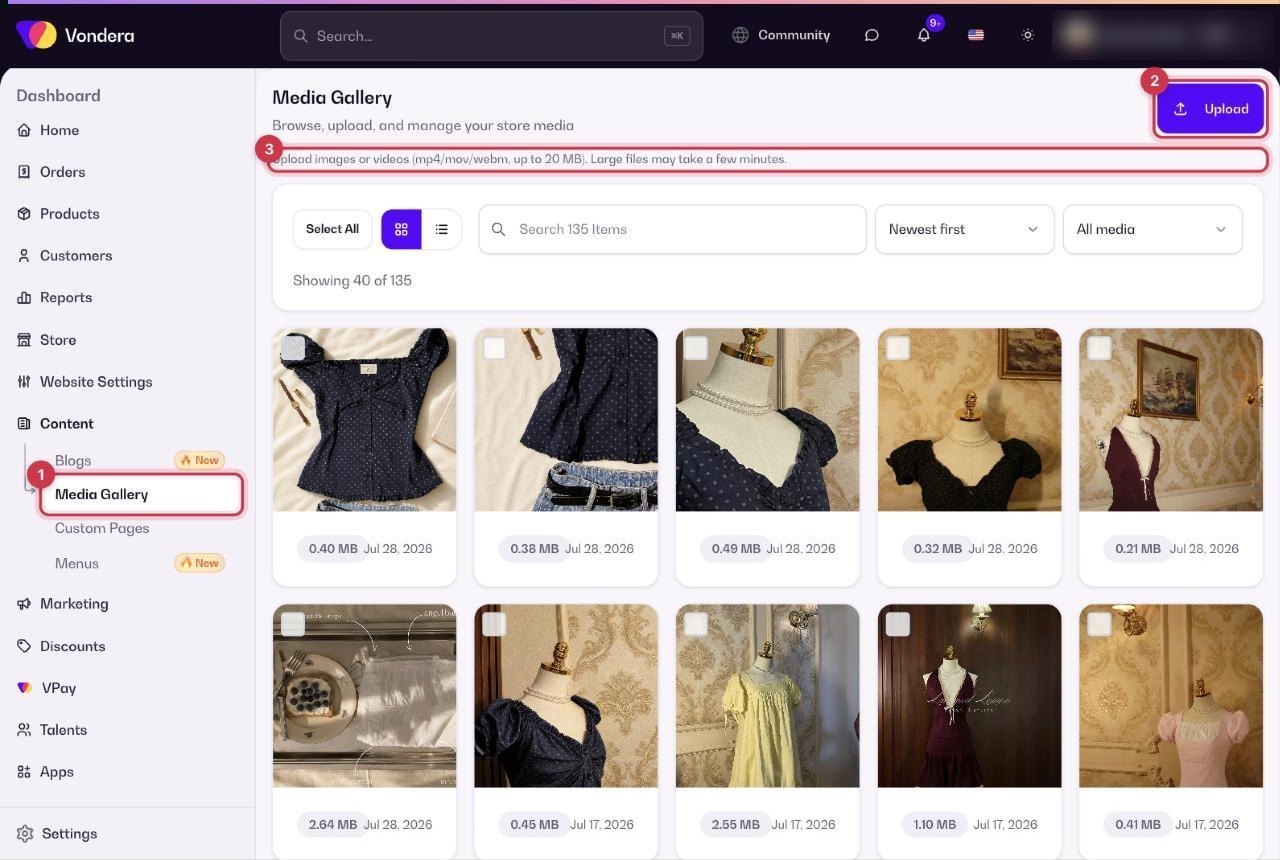
- Go to Content › Media Gallery.
- Drag your files into the upload area, or click it to choose files from your device.
- Wait for the upload to finish. Large files may take a few minutes.
Find and manage files
Common questions
Do I need to upload the same photo again for another product?
No. Choose it from the Media Gallery when you add images to the other product.
My video won’t upload. Why?
Check that it’s MP4, MOV or WebM and no bigger than 20 MB. Shorten or compress it if needed.
How do I check an image’s size before using it?
Each card shows the file size and dimensions. Click the card for a preview.