

 Photo: Luke Heibert / Unsplash
Pinned and deleted orders
Pin important orders so they are easy to find, and review or restore orders you deleted.
🖥️ Open in dashboard/dashboard/ordersTwo tabs in the orders list help you keep things tidy. Pinned Orders collects orders you want to keep an eye on, such as a VIP customer or an order waiting for stock. Deleted shows orders you removed, so a mistake is never permanent.
Where to find it
Go to Orders. Deleted and Pinned Orders are the last tabs in the status bar. Deleted orders can also be restored from Settings › Trash.
Pin an order
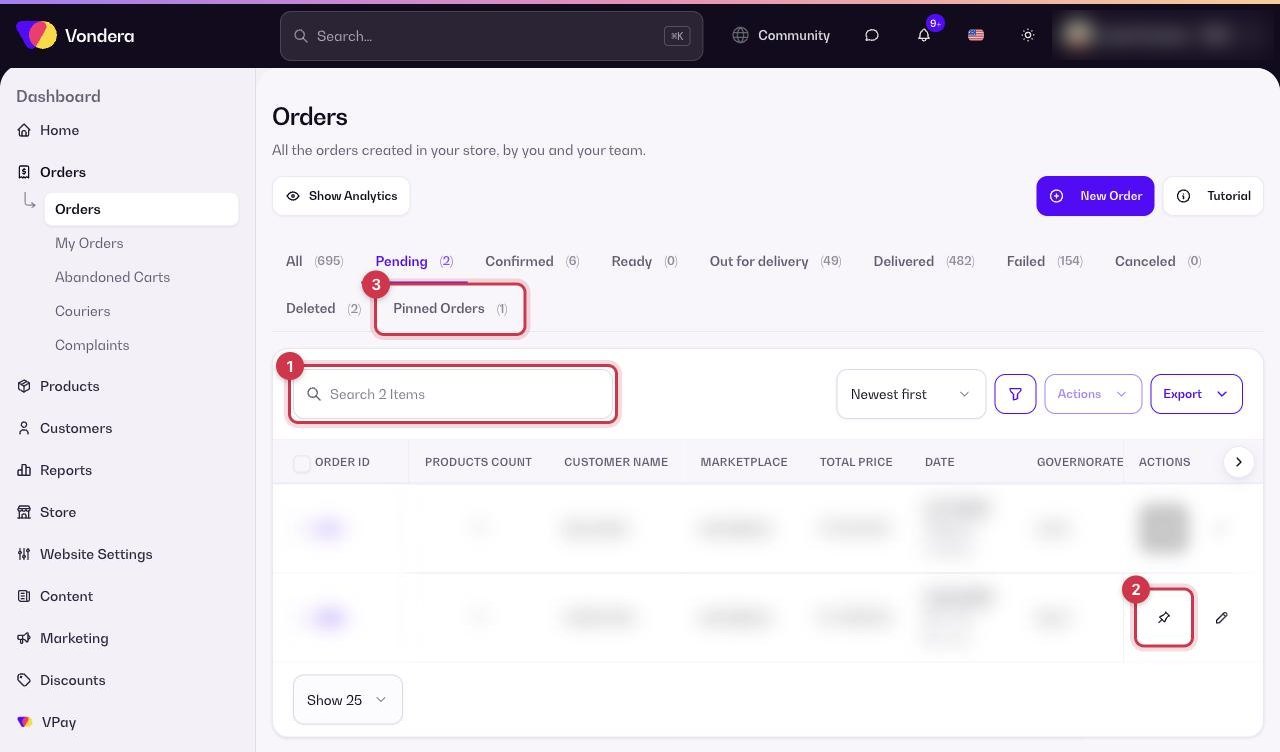
- Go to Orders and find the order.
- Use the order’s Actions to pin it.
- Open the Pinned Orders tab to see all your pinned orders in one place.
- Unpin the order when you no longer need to follow it.
💡 TipPinning does not change the order’s status. The order still shows in its normal status tab too.
Delete an order
- Open the order.
- Click Actions and choose Delete.
- Confirm. The order moves to the Deleted tab.
Restore a deleted order
- Open Settings and choose Trash in the settings menu.
- Open the Orders tab.
- Select the orders you want (or Select All) and restore them.
ℹ️ Good to knowDeleting an order affects the customer’s Trust Score, because one of the checks is No deleted orders. If an order is a duplicate or a test, deleting it is fine; for a real order the customer canceled, use Cancel order instead.
Common questions
Is a deleted order gone forever?
Not right away. It stays in the Deleted tab and in Settings › Trash, where you can restore it. Deleting it from the Trash removes it permanently.
Should I delete or cancel an order?
Cancel real orders that will not be delivered so your reports stay accurate. Delete only mistakes, duplicates or test orders.