

 Photo: Austin Distel / Unsplash
Connect tracking pixels (Meta, TikTok, Google, Snapchat, Clarity)
Add your Facebook Pixel and Conversion API, TikTok, Google, Snapchat and Microsoft Clarity IDs so your ads can measure and optimise sales.
🖥️ Open in dashboard/dashboard/pixels🎬 Watch the video
Videos are in Arabic.
Tracking pixels send what happens in your store (product views, add to cart, checkout, purchase) to your ad platforms. This lets Meta, TikTok, Google and Snapchat measure which ads bring sales and show your ads to people more likely to buy. Without them, your ad results are guesswork.
You will find them under Marketing › Tracking Pixels. The page has a tab for each platform: Facebook, Google, TikTok, Snapchat and Microsoft Clarity. Each tracker has its own Enable toggle, and nothing changes until you click Save Changes.
Facebook (Meta) Pixel and Conversion API
The easiest way to connect Meta is the guided Meta sales channel, which connects your Business Manager, pixel and catalog for you (from Settings › Sales Channels, click Setup next to Facebook). Use this page when you want to enter your Pixel ID and Conversion API key manually.
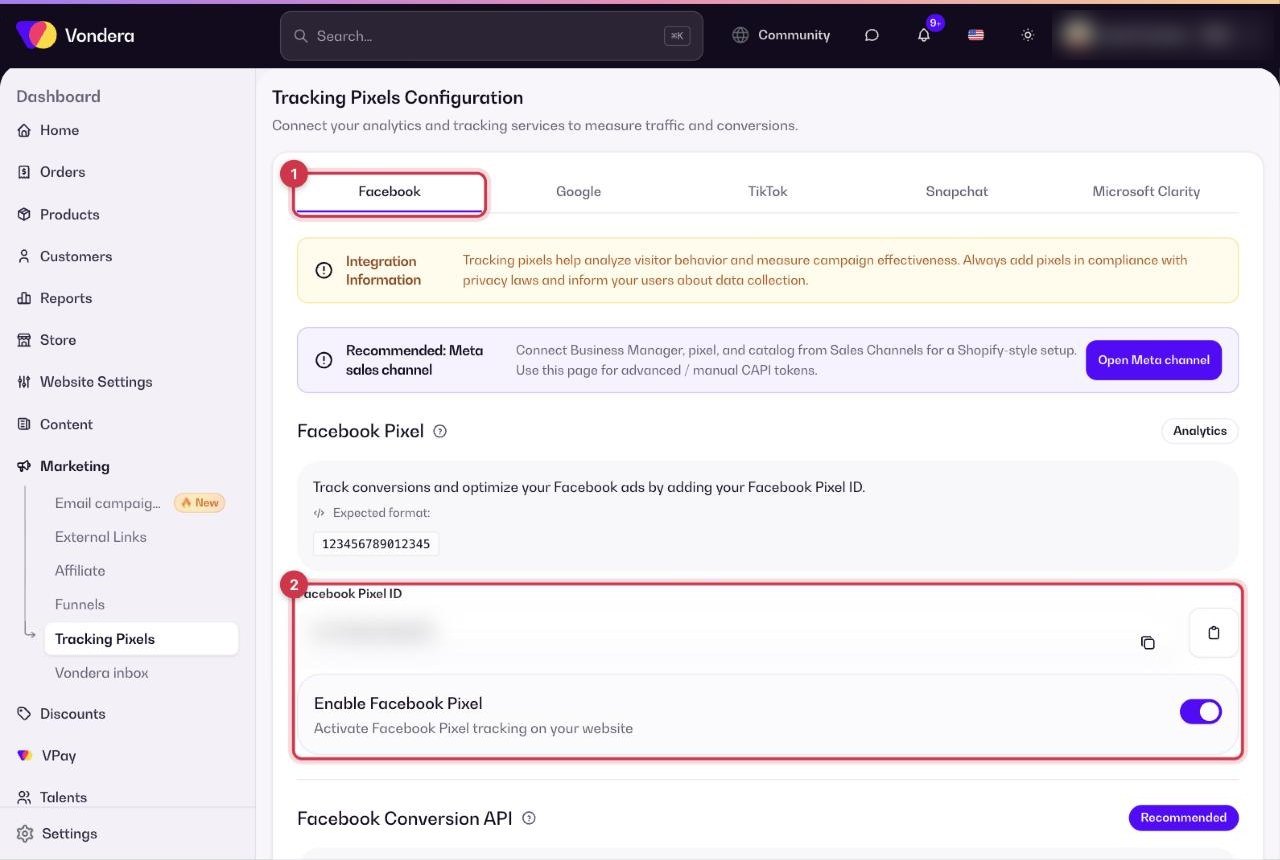
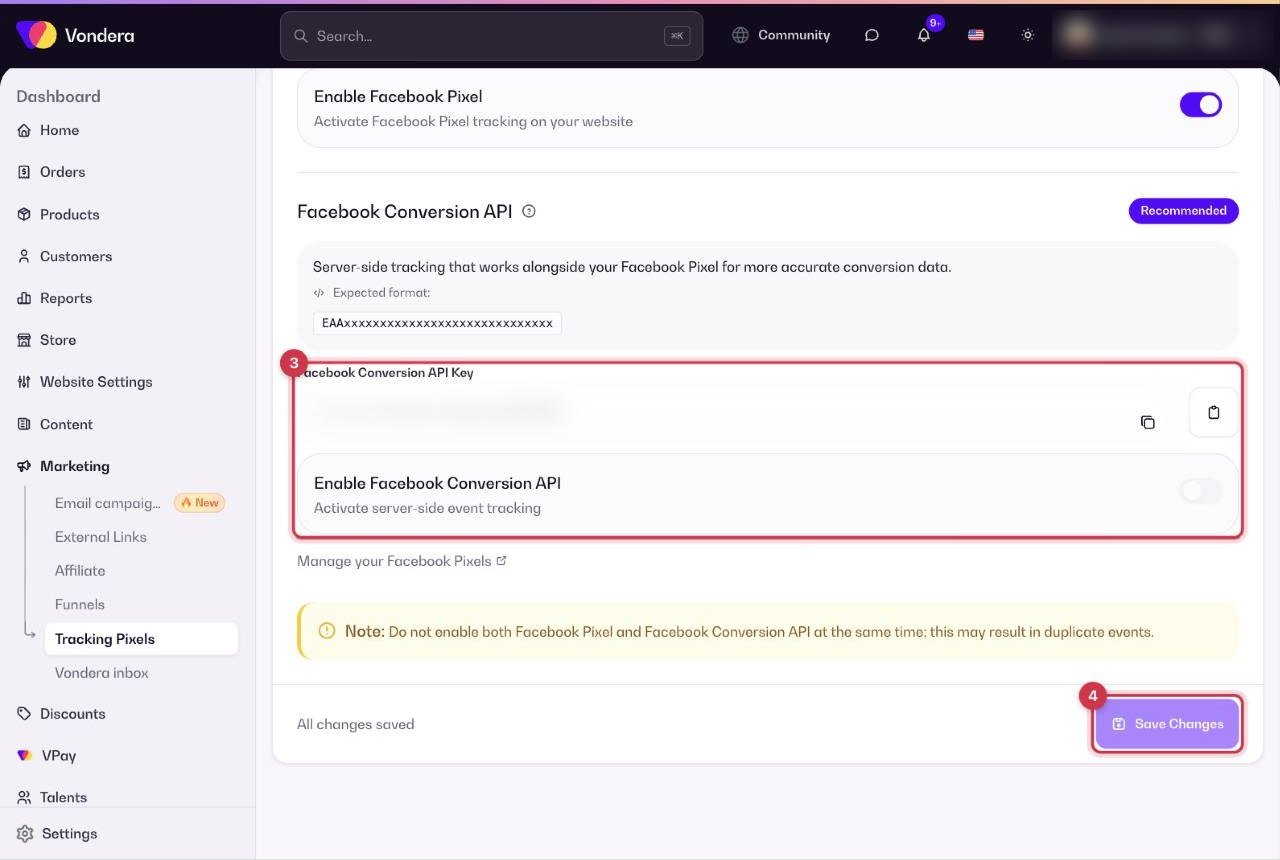
- Open the Facebook tab.
- Paste your Facebook Pixel ID (15–16 digits) and turn on Enable Facebook Pixel.
- Paste your Facebook Conversion API Key (it starts with EAA) and turn on Enable Facebook Conversion API.
- Click Save Changes.
Other platforms
Where to find each ID and token
Meta Pixel ID. Meta now also calls the pixel a dataset: the Dataset ID is the same number.
- Open Meta Events Manager (business.facebook.com/events_manager) and pick the right business portfolio at the top.
- In the left menu click Data sources (or Datasets) and choose your website’s pixel.
- Open the Settings tab and copy the Pixel ID / Dataset ID: 15 or 16 digits only, not the whole code.
Meta Conversion API key (access token).
- In Events Manager, open the same pixel and its Settings tab.
- Scroll to Conversions API and, under Set up manually (or Set up direct integration), click Generate access token.
- Copy the token straight away (a long code that starts with EAA): it is shown only once. You need full (developer) access to the business to see this link.
TikTok Pixel ID and access token.
- In TikTok Ads Manager, pick your ad account and go to Tools › Events (some accounts: Assets › Events).
- Under Web Events / Datasets, open your pixel and copy its Pixel ID (about 20 capital letters and numbers).
- Open the pixel’s Settings tab, find Events API, click Generate Access Token and copy it right away.
Snapchat Pixel ID. In Snapchat Ads Manager (ads.snapchat.com) open the menu, go to Events Manager, select your pixel (or create one: Web › Create New Pixel) and copy the Pixel ID. It looks like 1a2b3c4d-5e6f-7a8b-9c0d-1e2f3a4b5c6d.
Google Tag Manager ID. In tagmanager.google.com open your Web container: the ID starting with GTM- is at the top of the workspace (also under Admin › Install Google Tag Manager). A G- or AW- code is not a GTM ID.
Google Ads Conversion ID and Purchase label.
- In Google Ads, click Goals, then Conversions › Summary.
- Open your Purchase conversion action (or create one: + Create conversion action › Website, category Purchase).
- Under Tag setup, choose Use Google Tag Manager and copy the Conversion ID and Conversion label.
- Google shows the ID as digits only: type it in Vondera as AW- followed by the number (for example AW-123456789). Add to cart and Begin checkout each have their own label.
Microsoft Clarity Project ID. In clarity.microsoft.com open your project, click Settings › Overview and copy the Project ID (about 10 lowercase letters and numbers).
Common questions
Where do I find the Google Ads purchase label?
In Google Ads, go to Goals › Conversions › Purchase › Tag setup › Use Google tag, and copy the value that comes after send_to.
How do I know my pixels are working?
Open Reports › Conversion quality. It shows whether Meta Pixel, Meta Conversions API, TikTok Pixel and TikTok Events API are active, and scores how well your events can be matched.
I added my Pixel ID but nothing is tracked.
Check that the Enable toggle next to it is on and that you clicked Save Changes.
Do I need Google Tag Manager and Google Ads both?
No. Use GTM if you manage your tags there. Fill in the Google Ads fields only when you are not using GTM.
Will the Pixel and the Conversion API count my sales twice?
No. Vondera sends each event from both with the same event ID, and Meta keeps only one of them. Using both is recommended: the API catches the events the browser pixel misses.
Meta shows my purchases twice. Why?
The same Pixel ID is probably installed in two places, and Meta can’t merge two browser pixels. Add your pixel in one place only: either the guided Meta sales channel or the Facebook tab on this page, not both. Don’t also add it in Google Tag Manager or paste its code into Custom Head HTML.