

 Photo: Vitaly Gariev / Unsplash
Cash on delivery and deposits
Turn cash on delivery on or off, add a COD fee, and ask customers for a deposit before you confirm their order.
🖥️ Open in dashboard/dashboard/payment-settings?tab=websiteCash on delivery (COD) lets customers pay the courier when their order arrives. It is the most common way to pay in Egypt. A deposit lets you ask for part of the payment upfront, before you confirm the order, which helps protect you from fake or refused orders.
Go to Store › Payment settings and open the Website Payments tab.
Set up cash on delivery
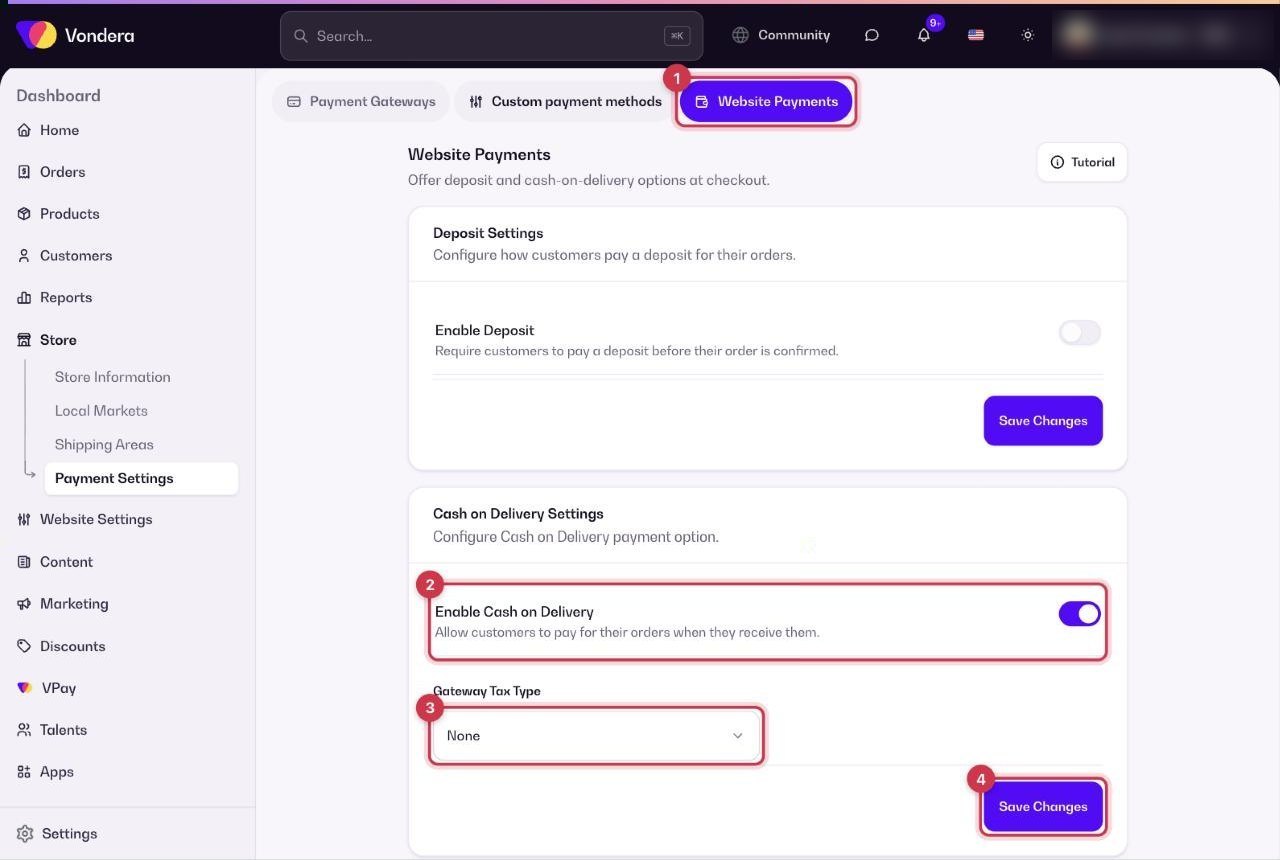
- Go to Store › Payment settings › Website Payments.
- Under Cash on Delivery Settings, turn on Enable Cash on Delivery.
- If you want to charge an extra fee for COD orders, set Gateway Tax Type to Fixed or Percentage and enter the value. Keep None for no extra fee.
- Click Save Changes.
Ask for a deposit
- On the same tab, under Deposit Settings, turn on Enable Deposit.
- Fill in the deposit options that appear.
- Click Save Changes.
Enable Cash on Delivery
Allows customers to pay when they receive the order.
Gateway Tax Type
None, Fixed or Percentage. An extra fee added to orders paid by cash on delivery.
Enable Deposit
Requires customers to pay a deposit before their order is confirmed. More options appear when you turn it on.
💡 TipIf you add a COD fee, mention it on your product pages or in your ads, so customers aren’t surprised at checkout.
ℹ️ Good to knowThe Deposit and Cash on Delivery sections each have their own Save Changes button. Save each section after you change it.
Common questions
If I turn off COD, can customers still order?
Yes, as long as you have at least one other payment option, such as a gateway or a manual method.
Can I add a deposit to an order I create myself?
Yes. The New Order form in Orders has a Deposit field for manual orders.
Why add a fee to COD?
Some stores add a small fee to cover collection costs, or to encourage customers to pay online instead.