

 Photo: Vitaly Gariev / Unsplash
Payment methods overview
How Payment settings work: online gateways, manual methods like bank transfer and wallets, deposits and cash on delivery.
🖥️ Open in dashboard/dashboard/payment-settings🎬 Watch the video
Videos are in Arabic.
Payment settings is where you decide how customers can pay you at checkout. You can combine three kinds of options: an online gateway for cards and wallets, manual methods such as bank transfer or InstaPay, and cash on delivery with an optional deposit.
Go to Store › Payment settings. The page has three tabs: Payment Gateways, Custom payment methods and Website Payments.
1. Payment Gateways: card and wallet payments
Connect one online processor to accept card and wallet payments. Only one gateway can be active at a time. The active gateway shows its name, an Active badge, its supported currencies, a Gateway Dashboard link and a Remove button to disconnect it.
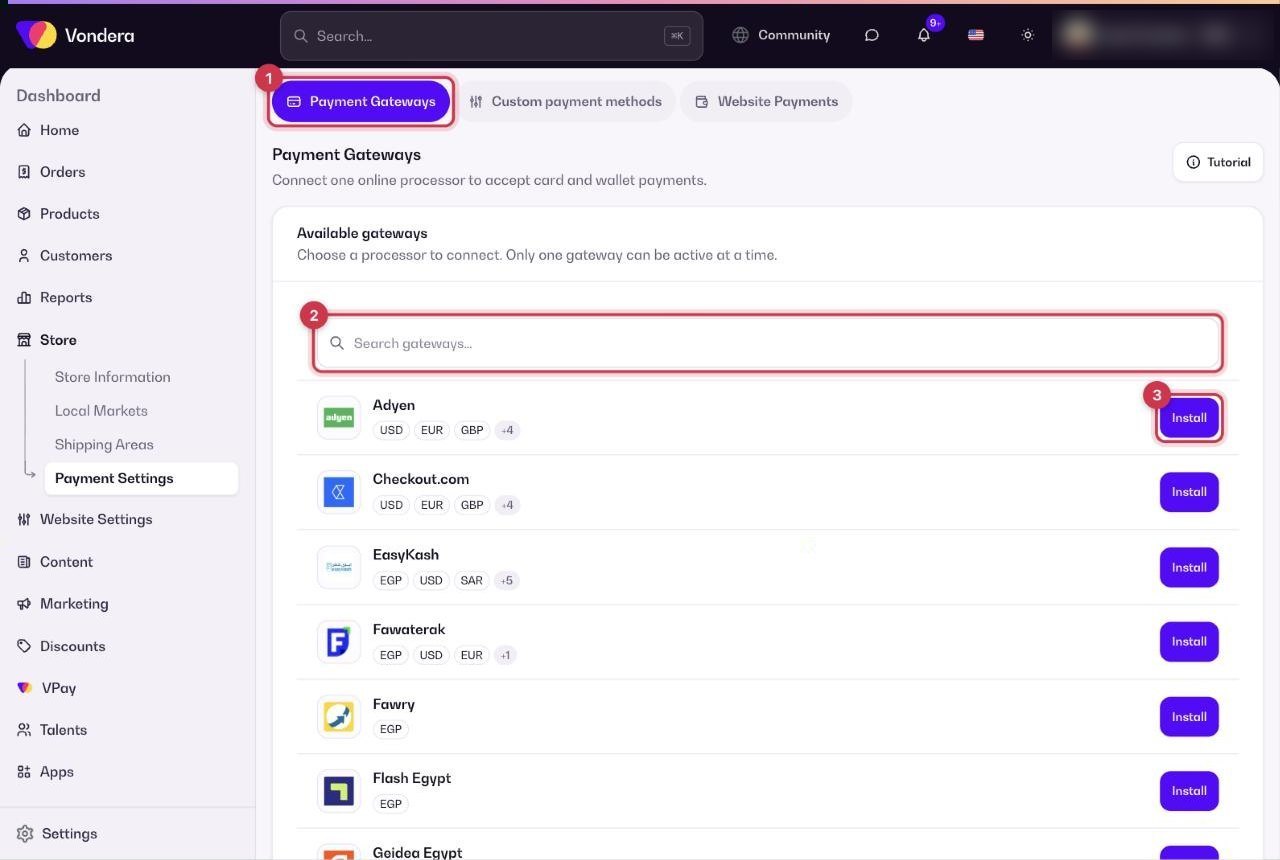
- Open the Payment Gateways tab.
- Find the gateway you have an account with. Use the search box if needed.
- Click Install, then enter the keys from your gateway account and confirm.
- To switch to another gateway, click Remove on the active one first, then install the new one.
Available gateways and the currencies shown for each:
Each gateway asks for different keys. Step-by-step setup for every one is in the App Store articles: Payment gateway apps.
2. Custom payment methods: bank transfer, wallets and more
Create offline options that you confirm yourself, such as InstaPay, Vodafone Cash, bank transfer or PayPal. For each one you choose whether the customer must upload a receipt (Receipt Required), whether it is shown at checkout (Active), and an optional extra fee as a fixed amount or a percentage. See Add a manual payment method.
3. Website Payments: deposit and cash on delivery
Turn Cash on Delivery on or off, add an optional COD fee, and decide whether customers must pay a Deposit before their order is confirmed. See Cash on delivery and deposits.
Common questions
Can I run two gateways at the same time?
No. Only one gateway can be active. You can still offer manual methods and cash on delivery alongside it.
How do I accept InstaPay?
Either add it as a custom payment method (you check each receipt yourself) or connect Flash Egypt, which supports InstaPay through a gateway.
How do I disconnect my gateway?
Open the Payment Gateways tab and click Remove on the active gateway.