

 Photo: Rodion Kutsaiev / Unsplash
Digital products
Sell downloads, codes, courses and other items with no shipping by marking a product as digital.
🖥️ Open in dashboard/dashboard/products/addA digital product is something you deliver without shipping — an e-book, a course link, a template, a license key or a gift code. When you mark a product as digital, Vondera treats it as an item with no shipping, and you add the content the customer gets after buying.
Where to find it
Go to Products › New Product, choose Standard product, and use the Digital product section of the form. You can also open an existing product and turn it on there.
Create a digital product
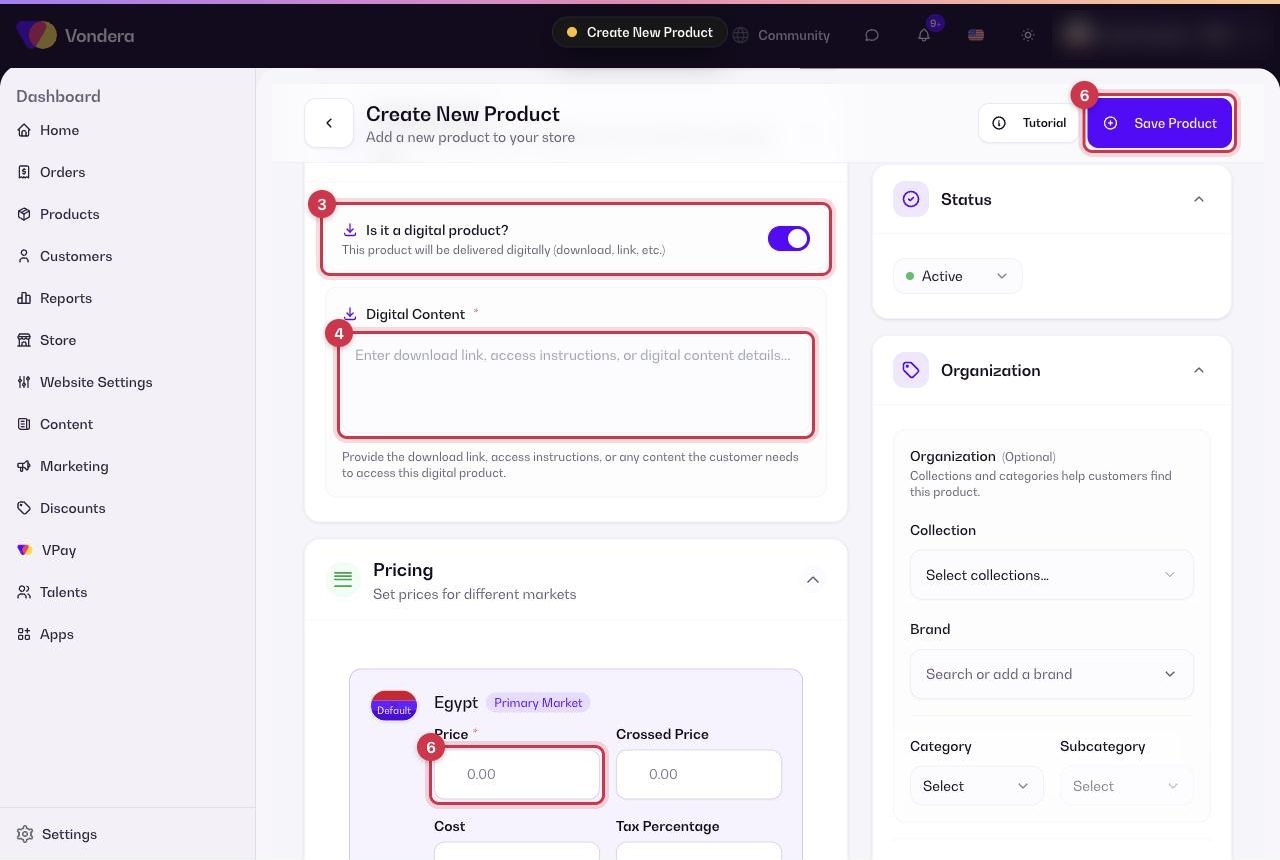
- Go to Products › New Product and choose Standard product.
- Fill in the title, description and images as usual.
- Turn on Digital product.
- Add the content the customer receives — for example a download link, an access link or a code.
- If you sell several versions (for example Basic and Pro), add them as variants and give each variant its own content.
- Set the Price in Pricing, then click Save Product.
Common questions
Will the customer be asked for a shipping address?
Digital products have no shipping, so no shipping cost applies to them.
Can I sell a digital and a physical version of the same item?
Create them as two separate products: one digital and one standard with stock.
Can I import digital products in bulk?
Yes. The bulk import file has an is_digital column. See Bulk import products.