

 Photo: Rodion Kutsaiev / Unsplash
Product pricing and tax
Set the price, crossed (old) price, cost and tax % for each market you sell in.
🖥️ Open in dashboard/dashboard/products/addThe Pricing section of the product form controls what customers pay and what you earn. Prices are set per market: if you sell in Egypt in EGP and in another country in its own currency, each market gets its own price fields.
Where to find it
Open a product from Products and go to the Pricing section. You will see one group of fields for each market, for example Egypt. Markets themselves are managed in Store › Markets.
Set a price
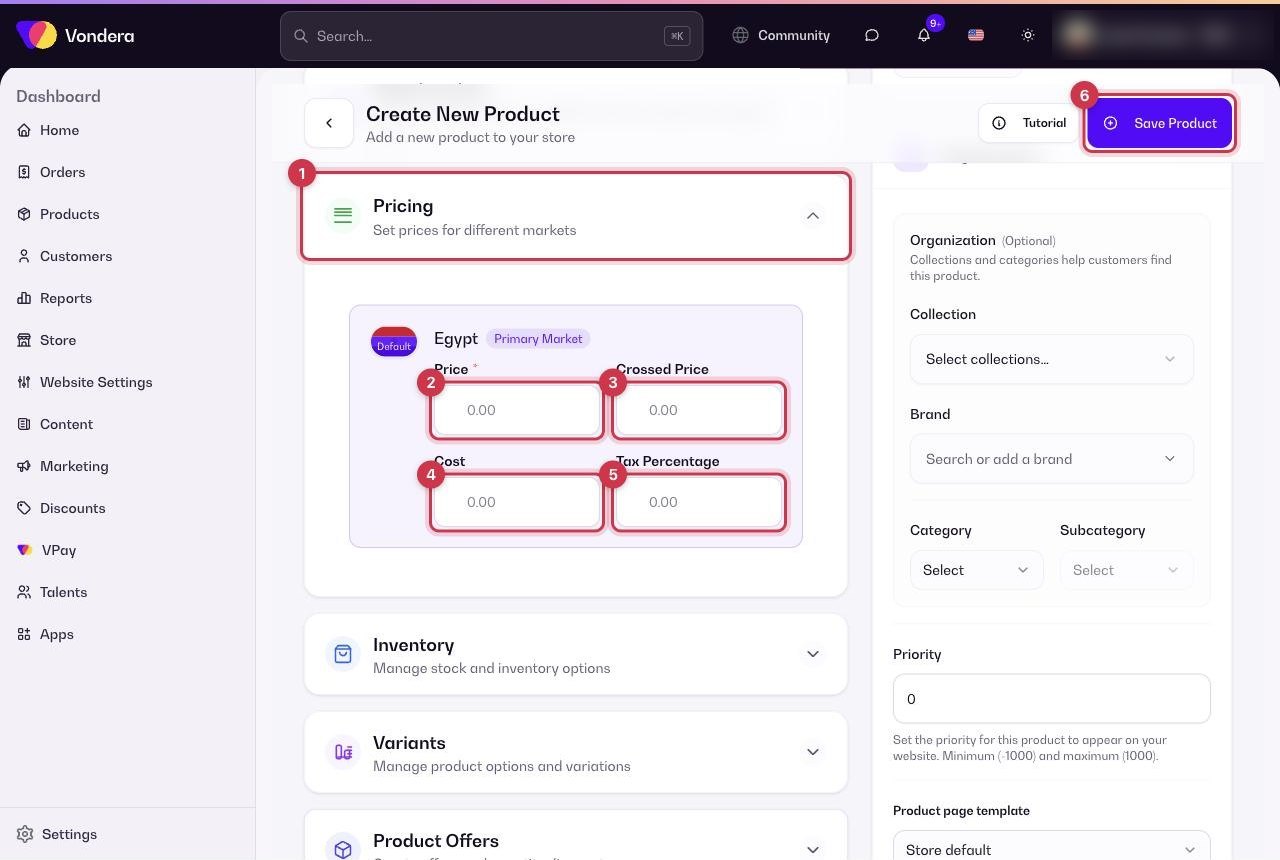
- Open the product and scroll to Pricing.
- Enter the Price for your default market. This field is required.
- To show a discount, enter a Crossed price higher than the price — it appears struck through next to the real price.
- Enter your Cost so reports can calculate your profit.
- Add a Tax % only if this product needs a tax rate.
- Repeat for every other active market, then click Save Product.
Common questions
Why does my crossed price not show?
It only appears when it is higher than the selling price. Set it to a bigger number than Price.
How do I sell in another country?
Add and activate the market in Store › Markets. A price field for that market then appears on your products.
Can a variant have a different price?
Yes. Set it on the variant in the Variants section. See Variants and inventory.