

 Photo: Luke Chesser / Unsplash
Products report
See which products sell best, and which get views but few sales.
🖥️ Open in dashboard/dashboard/statistics/productsThe Products report ranks your products by what they bring in. Use it to find your best sellers, to see which products earn the most, and — just as useful — to find products people look at but don’t buy, so you can fix their price, photos or description.
Where to find it
Go to Reports › Products.
Read the report
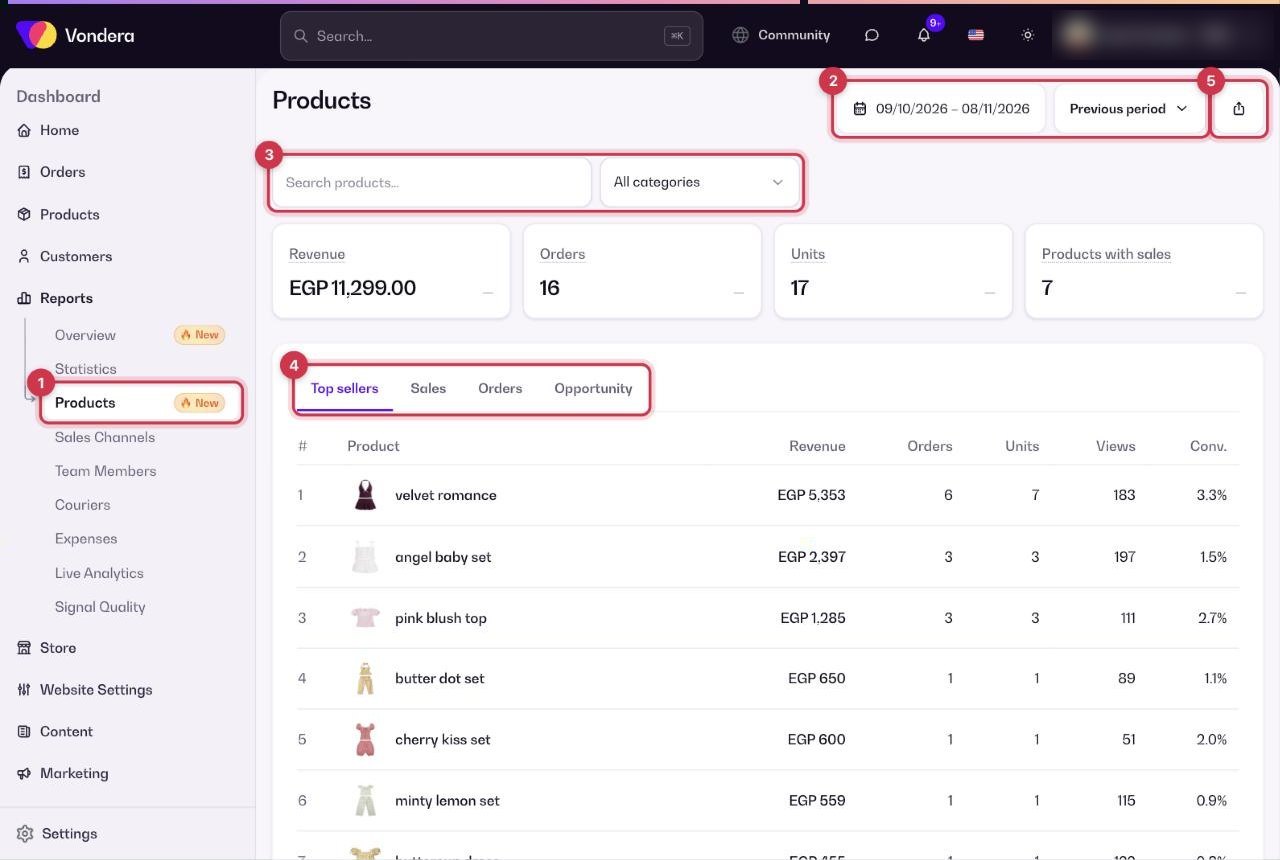
- Open Reports › Products. It shows the last 30 days by default.
- Change the date range if needed. The comparison with the Previous period shows how each number changed.
- Narrow the list with the category filter (All categories) or search for a product.
- Switch tabs to sort the list: Top sellers, Sales, Orders or Opportunity.
- Click Export CSV to download the table.
Revenue
Money earned from product sales in the period.
Orders
Number of orders that included the product.
Units
Number of pieces sold.
Products with sales
How many different products sold at least once.
Views
How many times the product page was viewed.
Conv.
Conversion: the share of product views that turned into orders (orders ÷ views).
Opportunity tab
Products with many views but few sales — your best candidates for improvement.
💡 TipCheck the Opportunity tab every week. A product with lots of views and low conversion often just needs a better main photo, a clearer size guide or a small price change.
Common questions
What is the difference between Orders and Units?
One order can contain several pieces. Orders counts orders; Units counts pieces.
Why don’t these totals match the Sales channels report?
The Sales channels report counts only orders that can be linked to a traffic source, so its totals can be lower for the same dates.