

 Photo: Domenico Loia / Unsplash
Receipt options
Choose the receipt language, thank-you message, and what prints on receipts: seller name, “can’t open package”, shipping serial and barcode.
🖥️ Open in dashboard/dashboard/settings?section=receipt-optionsReceipts travel with your parcels and are the first thing your customer sees when the order arrives. Receipt Options let you choose the language, add a thank-you message, and decide which details are printed — like your seller name, a “can’t open package” label, and the courier’s tracking number and barcode.
Go to Settings › Receipt Options.
Set up your receipts
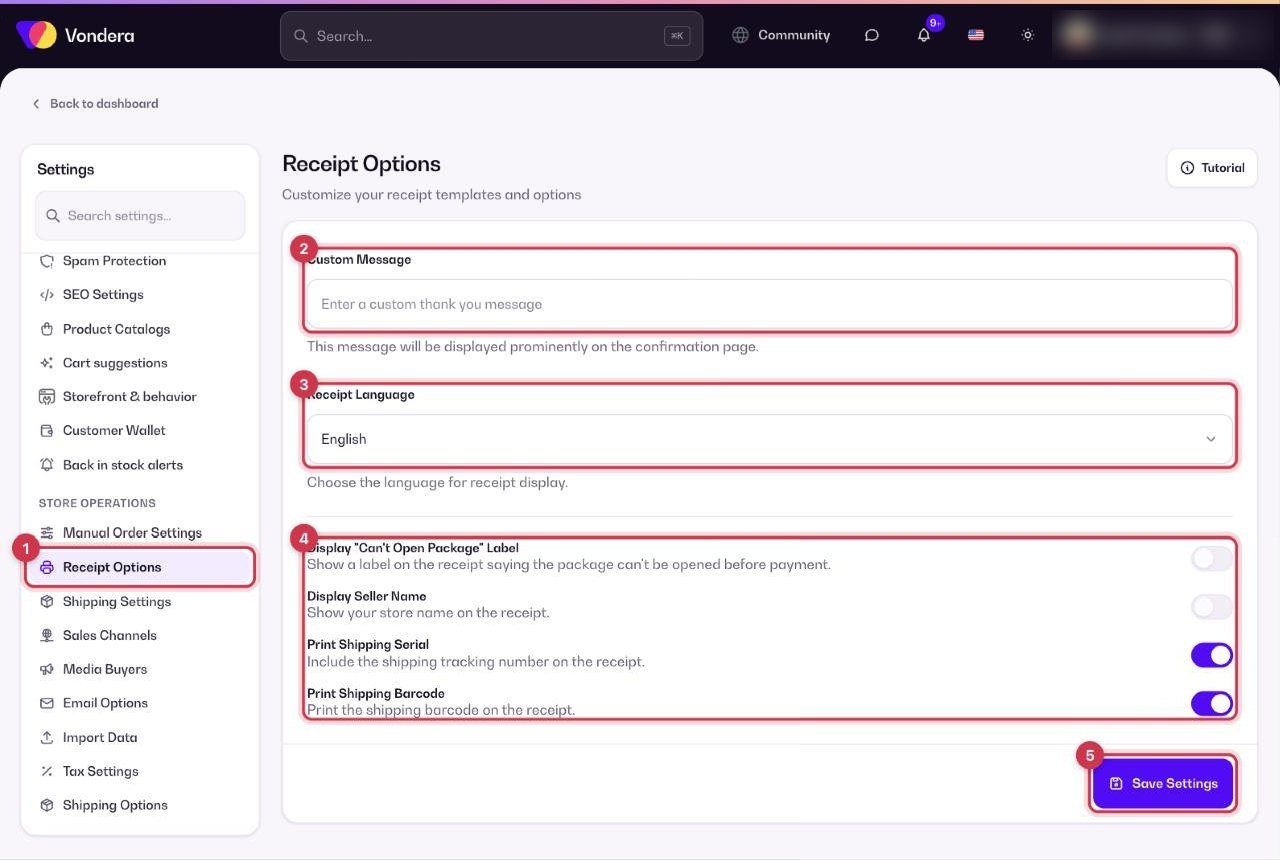
- Open Settings › Receipt Options.
- Write your Custom Message, for example a short thank-you.
- Choose the Receipt Language.
- Turn on the labels and shipping details you want printed.
- Click Save Settings, then print a receipt from an order’s Export menu to check it.
Custom Message
A thank-you message shown to the customer on the order confirmation.
Receipt Language
The language receipts are printed in, for example English.
Display “Can’t Open Package” label
Prints a note that the package can’t be opened before payment.
Display Seller Name
Prints your store (seller) name on the receipt.
Print Shipping Serial
Prints the courier’s tracking number.
Print Shipping Barcode
Prints the shipping barcode so the courier can scan it.
💡 TipIf you ship with an integrated courier, turn on Print Shipping Serial and Print Shipping Barcode — it saves time at pickup and reduces mix-ups.
Common questions
Where do I print receipts?
Open the order (or select orders in the list) and use the Export menu to print.
Can I print receipts in Arabic?
Choose the language you want from Receipt Language and save.
Why is there no barcode on my receipt?
Turn on Print Shipping Barcode. The barcode comes from the courier, so the order needs to be sent to a courier first.