

 Photo: Domenico Loia / Unsplash
Product catalogs for Meta, TikTok and Google
Use your auto-updating product feed links to sync your products with Meta, TikTok and Google Merchant Center.
🖥️ Open in dashboard/dashboard/settings?section=catalogs🎬 Watch the video
Videos are in Arabic.
To run product ads — like Facebook and Instagram catalog ads, TikTok shopping ads or Google Shopping — each platform needs a list of your products. Vondera creates that list for you as a feed link: a CSV file of your published products that updates automatically. You paste the link once, and the platform keeps your products in sync.
Go to Settings › Product Catalogs. You’ll see three feed links — Meta, TikTok and Google — each with a copy field, an Open button and “How to connect” steps.
Connect to Meta (Facebook & Instagram)
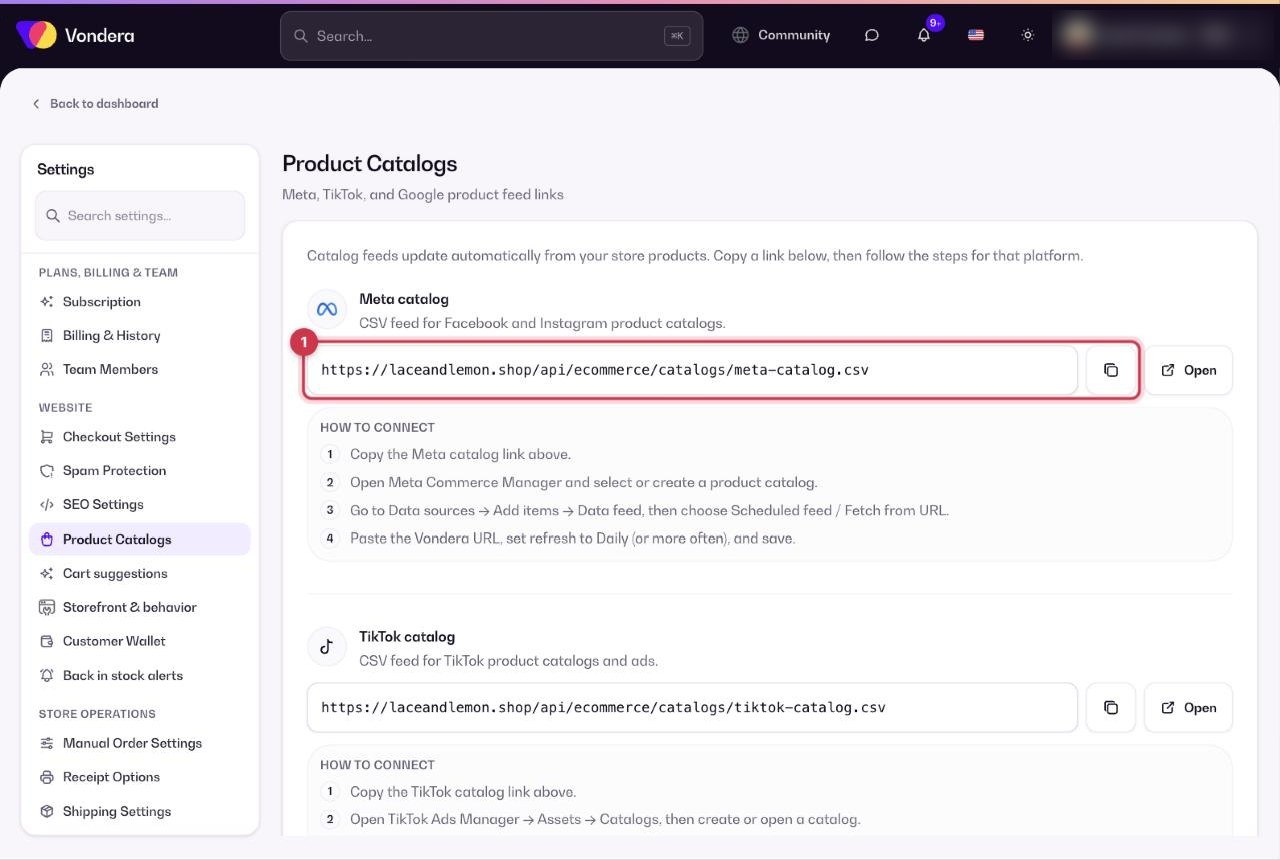
- Copy the Meta feed link.
- In Meta Commerce Manager, open your catalog and go to Catalog › Data sources.
- Click Add items, choose Data feed, then Next.
- Choose to add the file from a URL, paste the link, then click Next.
- Name the feed, set the currency to your store currency (for example EGP), set the schedule to Daily and click Upload.
Connect to TikTok
- Copy the TikTok feed link.
- In TikTok Ads Manager, go to Assets › Catalog and open your catalog.
- Click Manage › Products › Add Products, then choose Data Feed Schedule.
- Enter a feed name, paste the link, set the frequency to Daily and click Import.
Connect to Google Merchant Center
- Copy the Google feed link.
- In Google Merchant Center, go to Products › All products and click Add products (or Settings › Data sources › Add product source).
- Choose Add products from a file, then Enter a link to your file, and paste the link.
- Click Edit schedule, choose Daily, and save.
Common questions
Do I need to upload the feed again when I add products?
No. The feed updates automatically, and the platform picks up changes on its next scheduled fetch (daily if you set it that way).
A product is missing from my catalog. Why?
Make sure the product is active and published, then wait for the next daily fetch — or start a manual fetch from the platform.
Is this the same as the Meta sales channel setup?
No. The feed only sends your product list. Connecting your Meta business and pixel is done from Sales channels and Tracking Pixels.